Legati is built around a simple idea: put the important things your family may need later into one secure place, then decide who should be able to reach them and under what circumstances. This guide walks through the subscriber experience in plain language, from the first checklist to files, videos, delegates, and wellness checks.
1. Start with the checklist
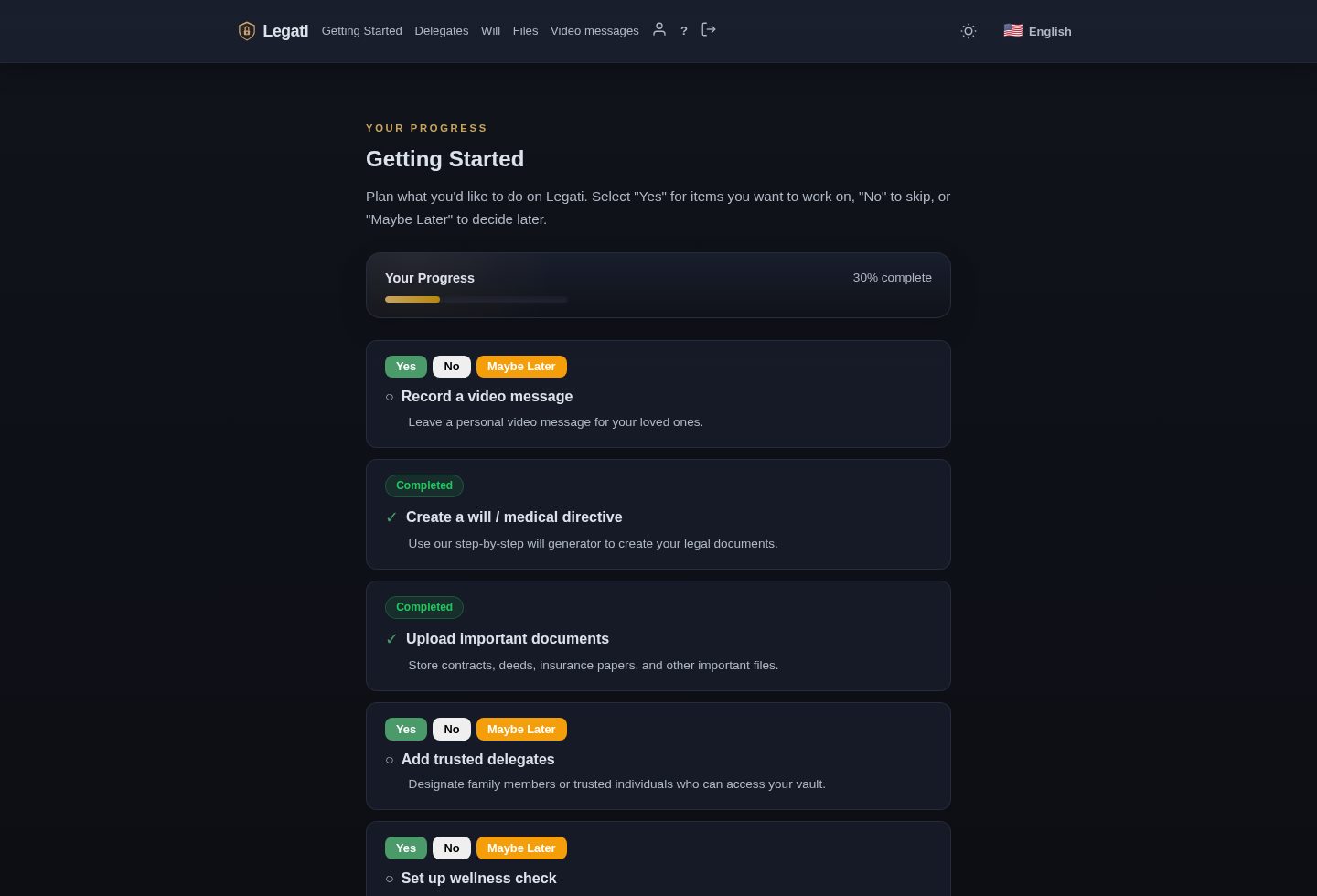
After subscribing, the checklist is the best place to begin. Think of it as a guided setup list. Instead of expecting you to know what to do first, Legati breaks the process into concrete actions: upload important files, create a will, add a delegate, record a video message, and review the rest of your account setup.
Each checklist item asks a simple question: have you done this, do you need it, or do you want to come back later? If you are not ready to complete a step, you can mark it for later and move on. The checklist is not a legal form and it is not a test. It is a practical reminder system so nothing important is forgotten.
A practical first pass
- Open the checklist and read each item once.
- Mark anything you already completed.
- Upload at least one key document, such as an insurance policy or ID scan.
- Add one trusted delegate, even if you later refine their access.
- Come back later for the will, videos, and wellness settings if you need more time.
2. Upload files into your encrypted vault
The dashboard is where your files live. A file can be a PDF, image, scanned document, letter, insurance policy, will, medical directive, account instruction, or anything else your family may need. You choose a file from your device, press upload, and Legati adds it to your account.
For a layman, the important thing to know is this: Legati is not just a normal shared folder. Your files are protected with encryption. That means the stored version is scrambled in a way that cannot be read without the right key. The app also shows your storage usage, so you can see how much space is used and how much remains.
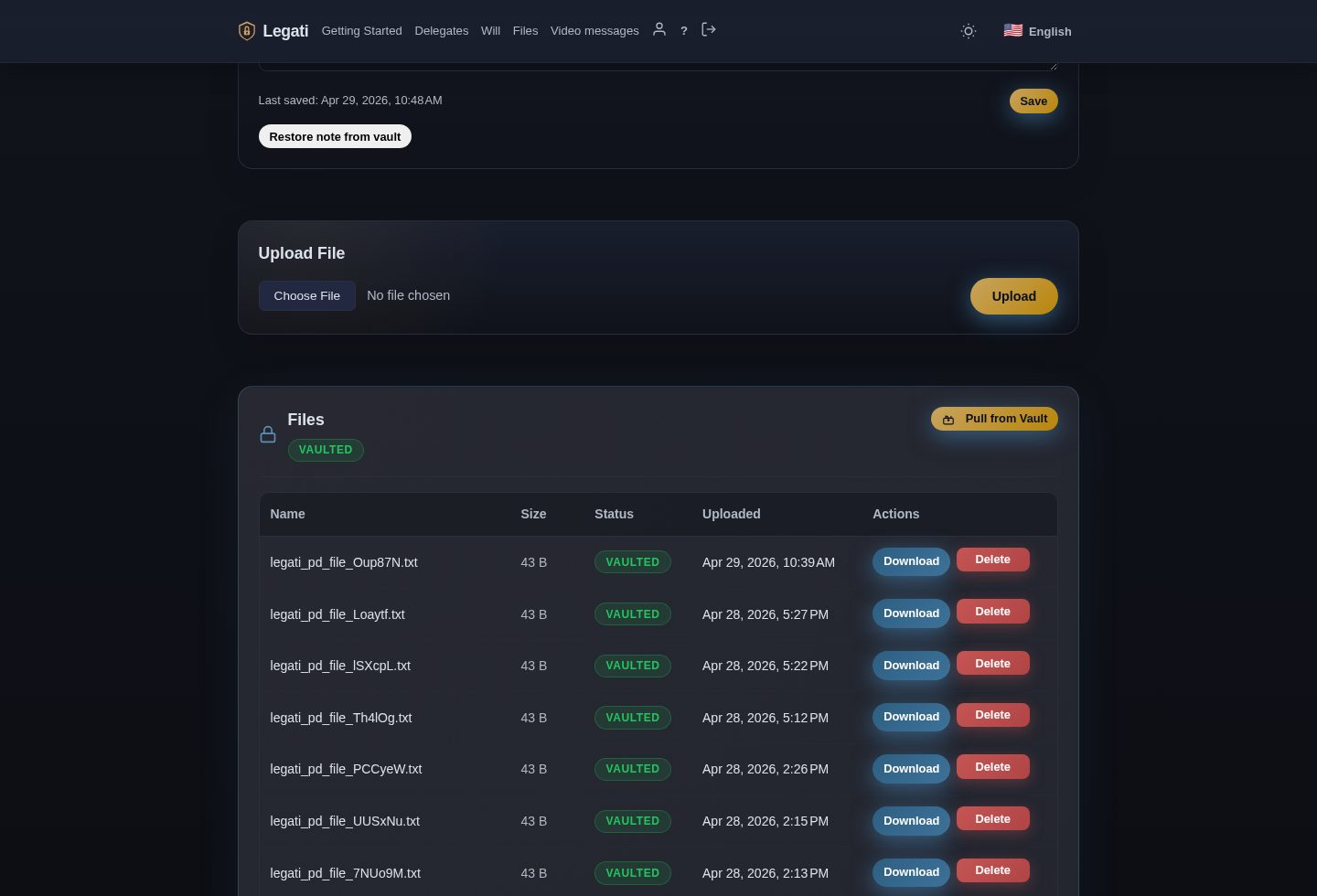
Files can appear in a working area before they are vaulted. Vaulting is the step that bundles and protects files for long-term secure storage. If you see a Vault or Vault all action, use it when you are ready to move files into the protected vault. If you need to work with files again, the dashboard also provides download and vault-management controls.
3. Use the secure access note carefully
The secure access note is optional. It is meant for information that helps your delegates understand what to do later. For example, you might leave instructions about where to find a safe, which attorney to call, or which accounts matter most. You should not treat it like a casual notepad.
If you choose to use it, write clearly. Use full names, plain descriptions, and enough context that a trusted person can act without guessing. The note is encrypted, and Legati can vault it with the rest of your secure material.
4. Record a normal video message
A normal video message is a file you record or upload now so it can be kept with your other legacy material. It can be practical, personal, or both. Some people record a short explanation of where documents are. Others record messages for birthdays, family milestones, or final wishes.
Keep video messages focused. A good first video is only a few minutes long. Say who the message is for, why it matters, and where the recipient should look next. If you are recording instructions, mention the related files you uploaded so your delegate is not left searching.
5. Schedule a timed video message
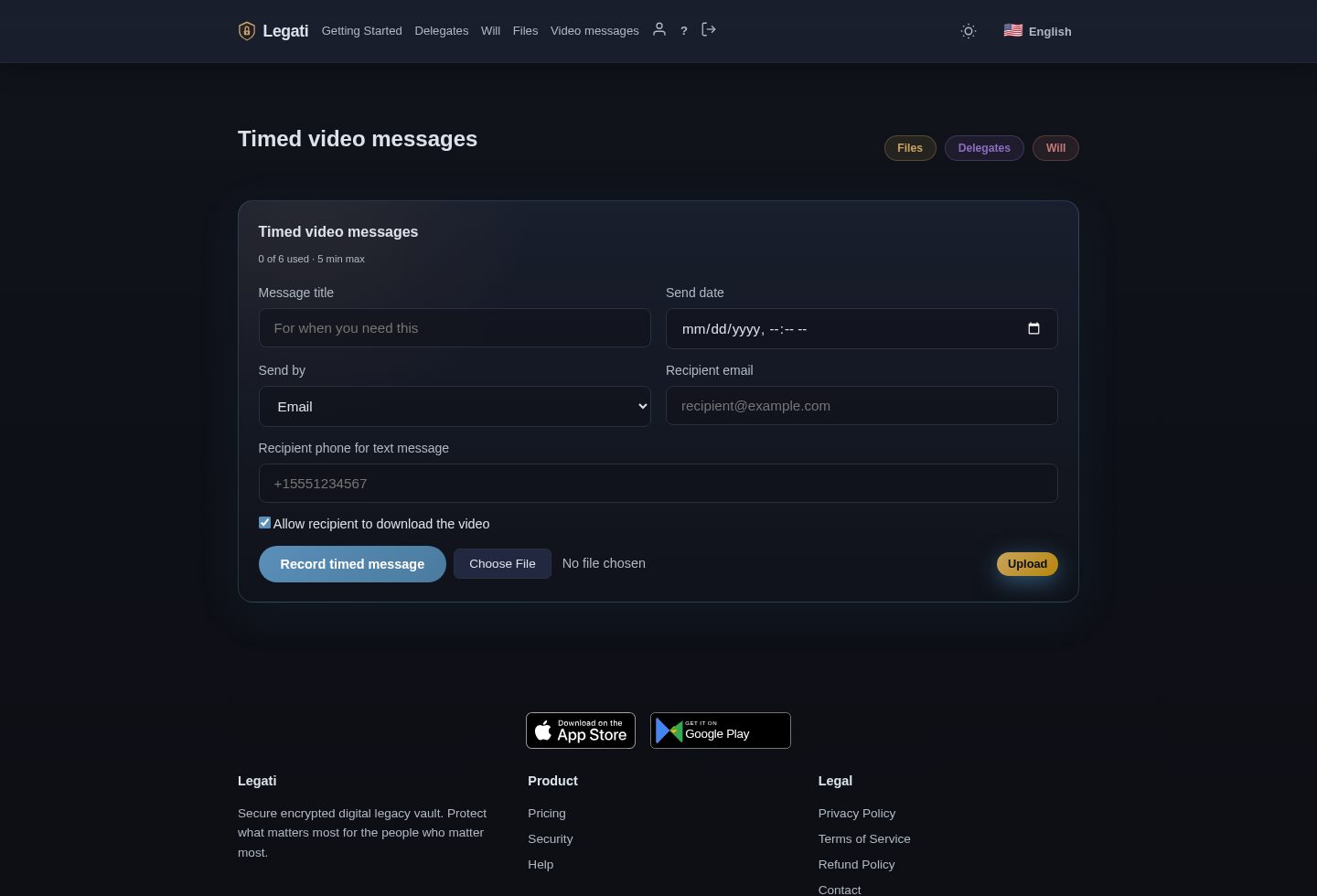
Timed video messages are different from normal uploaded videos. A timed video is prepared now, but delivery is controlled by the schedule and recipient settings you choose. This is useful when a message should be delivered later instead of being immediately available in your file list.
The timed video screen lets you add the message, choose who should receive it, and manage the status of scheduled messages. You can use it for practical reminders, personal messages, or future instructions. The key idea is simple: record once, set the delivery details, and let Legati handle the timing.
What to say in a timed video
- Start with the recipient's name so the message feels clear and intentional.
- Explain why the message exists and when you expected it to be seen.
- Point to any related files in Legati, such as your will or instructions.
- Keep it direct. A short, understandable video is better than a long one nobody finishes.
6. Add delegates
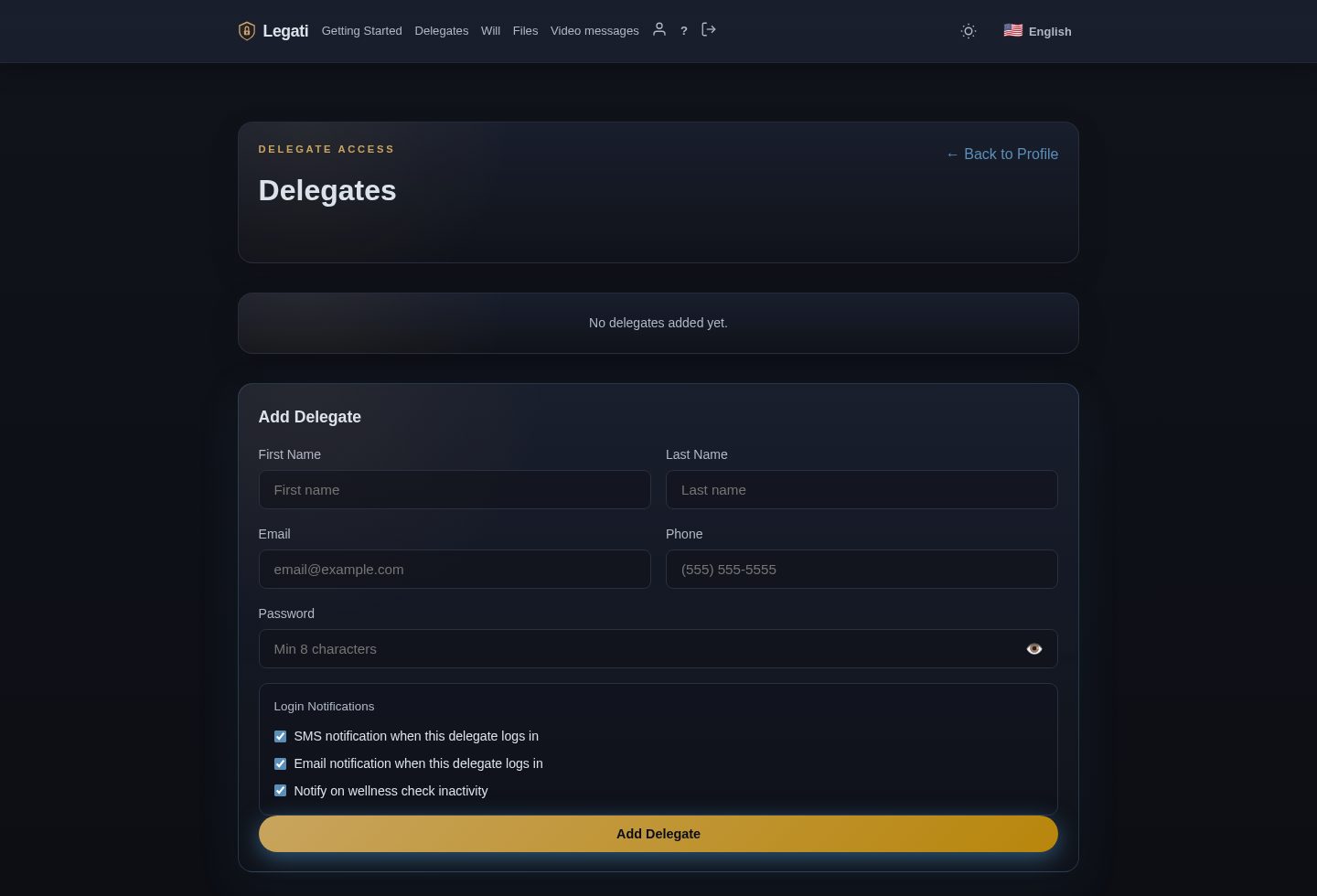
A delegate is a trusted person you choose to receive controlled access. This might be a spouse, adult child, sibling, executor, attorney, or close friend. The delegate system exists because handing someone your password is risky. A delegate should not need your full account login to help when the time comes.
When you add a delegate, Legati creates a controlled access path for that person. You can decide whether the delegate should be included in wellness notifications, and you can update or remove delegates later. The point is to give the right person enough access to help, without giving them everything today.
Choose delegates carefully. Use people who are reliable, reachable, and likely to understand your wishes. Tell them they have been named. A delegate who does not know Legati exists may still be surprised later, even if the system works exactly as designed.
7. Set wellness checks
Wellness checks are periodic check-ins. You choose a method and an interval, and Legati checks whether you are still responsive. If you confirm, nothing else needs to happen. If you do not respond within the configured window, Legati can notify delegates who are opted in for wellness alerts.
This feature is useful for people who live alone, travel often, have health concerns, or simply want an extra safety layer. It does not replace emergency services, family contact, medical care, or legal planning. It is a backup signal: if you stop responding, the people you trust can be alerted.
8. Create or store your will
Legati includes will-related tools, but it is important to understand their role. A will generator can help you organize your wishes and produce a document to review. It is not a replacement for a qualified attorney, and requirements vary by jurisdiction. Witnessing, notarization, beneficiary rules, guardianship rules, and forced-heirship rules can all depend on where you live.
A good workflow is to use Legati to gather your decisions, generate a draft if appropriate, and then review it with a professional. Once finalized, upload the signed version to your vault so your delegate can find it later.
9. Keep the account current
A legacy vault is only useful if it stays current. Review it after major life events: marriage, divorce, a new child, a death in the family, a move, a new home, a new business, or a major medical diagnosis. Update delegates if relationships change. Replace old documents with new signed versions. Remove information that is no longer accurate.
A simple maintenance routine
- Every three to six months, log in and review your checklist.
- Download one file as a test so you know access works.
- Check that delegate email addresses and phone numbers are still correct.
- Confirm your wellness settings still match your life.
- Add new documents and delete outdated duplicates.
10. The whole picture
Legati works best when you use the features together. The checklist gives you direction. File upload gives your important documents a secure home. Secure notes explain what matters. Video messages add context and humanity. Timed video lets you prepare future delivery. Delegates give trusted people a controlled way in. Wellness checks provide an extra signal if you stop responding.
You do not need to finish everything in one sitting. Start with the checklist, upload the first few documents, add one delegate, and build from there. The goal is not perfection on day one. The goal is to make tomorrow easier for the people who may one day need your help.